

How to Write a Good ChatGPT Prompt: Basics, Examples, and Ways to Earn
We’ve written a lot about AI and various AI tools lately, but the question we get asked most often is this one: how do you write a ChatGPT prompt that actually gives you useful answers?
That’s why we decided to break down, step by step, how to build a good ChatGPT prompt , from the basics and key elements to real examples you can start using right away.
And if you’re already comfortable writing a ChatGPT prompt, you’ll find, toward the end, where you can sell them and turn the skill into extra income.
What Is a ChatGPT Prompt?
A ChatGPT prompt is an instruction, or set of instructions, that you give ChatGPT in order to get the answer you want.
It can be:
- a single short sentence
- a structured paragraph with several elements
- part of a sequence of connected prompts (prompt chaining)
The quality of the answer depends directly on the quality of the ChatGPT prompt. The clearer and more precise your prompt, the more useful and accurate the response you’ll get back.
It’s also worth noting that response quality depends on whether you’re using the free or paid (more advanced) version of ChatGPT.
Core Elements of a Good ChatGPT Prompt
Five Key Elements of a Strong ChatGPT Prompt
A well-written ChatGPT prompt usually contains five elements. You don’t need all of them every time, but the more you include, the more precise and useful the response will be.
1. Role
You tell ChatGPT who it is for this particular task.
Examples:
- “You are a digital marketing expert…”
- “You are an experienced math teacher…”
- “Act as a financial advisor…”
Why it matters: The model adjusts its style, expertise level, and tone based on the role you assign in the prompt.
2. Task
You clearly state what exactly needs to be done. Use concrete verbs: write, analyze, compare, explain, generate.
Examples:
- “Write a 500-word blog article about…”
- “Analyze this text and pull out the key points…”
- “Generate 10 title ideas for…”
3. Context
You provide background information that helps the model understand the bigger picture.
Useful context includes: the target audience, the purpose of the text, the industry, the reader’s knowledge level, and the platform where it will be published.
Without context, a ChatGPT prompt often produces an answer that’s too generic.
4. Constraints
You clearly state what you do NOT want, or what rules the prompt must follow.
Examples:
- “Use simple language, no technical terms”
- “300 words maximum”
- “No emojis”
- “Write in the first person”
5. Output Format
You describe what the answer should look like.
Examples:
- a bulleted list
- a two-column table
- numbered steps 1–5
- title + three subheadings + conclusion
Example of a Simple but Effective ChatGPT Prompt
You are an experienced copywriter.
Task: Write promotional copy for an online course.
Context: The target audience is beginners who want to learn digital marketing.
Constraints: Keep it short (under 150 words) and motivating.
Format: Title + 3 short paragraphs.
Prompt Chaining – An Advanced Technique
Instead of writing one long, complex ChatGPT prompt, use several connected prompts, where each one builds on the result of the last:
- Step 1: Ask for research on the topic
- Step 2: Based on that research, ask for an article outline
- Step 3: Write each section separately
This technique is also called prompt stacking or a multi-stage prompt. Results are consistently better than trying to cram everything into a single “mega-prompt.”
Common Mistakes When Writing a ChatGPT Prompt
These mistakes are the most common reasons a ChatGPT prompt produces poor or unhelpful answers:
- Too generic a prompt – “Write me something about marketing” produces an overly generic answer
- Multiple tasks at once with no structure – confuses the model and lowers the quality of every point
- No context – the model doesn’t know who it’s for, why, or where it will be used
- Unclear output format – you get an answer that doesn’t match what you actually needed
- Assuming “the model knows what I mean” – always be explicit in your ChatGPT prompt
Quick Formula for Building a ChatGPT Prompt
If you’re not sure where to start, use this simple formula:
Role + Task + Context + Constraints + Format
In one sentence:
“You are [role], do [task], for [context], following [constraints], in [format].”
Universal Prompt Template (Copy-Paste)
This is a basic template that works for 80% of tasks when writing a ChatGPT prompt.
ROLE:
You are [who ChatGPT should be for this task].
TASK:
Your task is [exactly what needs to be done].
CONTEXT:
This is being used for [purpose].
The target audience is [who].
The audience's knowledge level is [beginner/intermediate/advanced].
CONSTRAINTS:
- [rule 1]
- [rule 2]
- [what to avoid]
OUTPUT FORMAT:
- [e.g. list]
- [e.g. table]
- [e.g. steps]
If you’re not sure what to include, it’s better to write too much than too little.
What Is AIPRM and How Does It Work
AIPRM is:
- a browser extension for ChatGPT
- a system for saving, categorizing, and sharing prompts
- a public library of prompts created by other users
When someone uses AIPRM, they don’t write a ChatGPT prompt manually — they click on a ready-made one, and AIPRM automatically inserts it into ChatGPT.
What an AIPRM Prompt Looks Like (vs. a Regular Prompt)
An AIPRM prompt isn’t just plain text. It has a structure and metadata.
Every AIPRM prompt includes:
- Prompt name
- Description (what it does)
- Instructions (the actual ChatGPT prompt)
- Variables (input fields)
- Categories and tags
- Visibility level (public / private)
Step 1: Draft the ChatGPT Prompt Locally (Before AIPRM)
Before uploading it to AIPRM, people usually:
- test the ChatGPT prompt directly inside ChatGPT
- clean it up and remove unnecessary text
- confirm it works in a single click
Step 2: Open the AIPRM Prompt Editor
- Install the AIPRM extension
- Open ChatGPT
- Click “Add Prompt” / “Create Prompt”
This opens the AIPRM Prompt Editor.
Step 3: Fill In the AIPRM Fields (Important)
The default template is Basic, and it lets you build almost everything automatically.
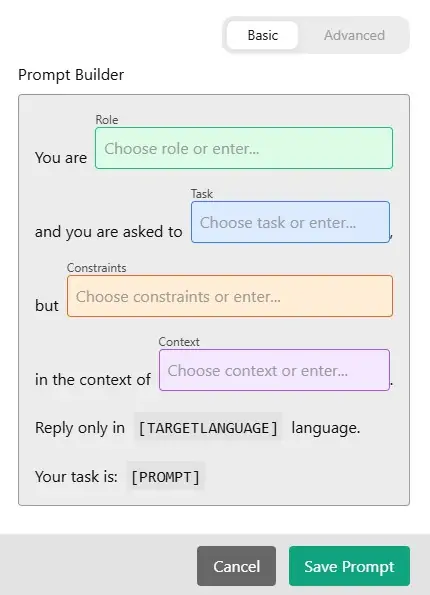
When you click on a given field, a dropdown menu appears with options to choose from. This mode works well for less advanced users.
Here we’ll describe the more advanced (Advanced) mode. In the top-right corner, switch from Basic to Advanced.
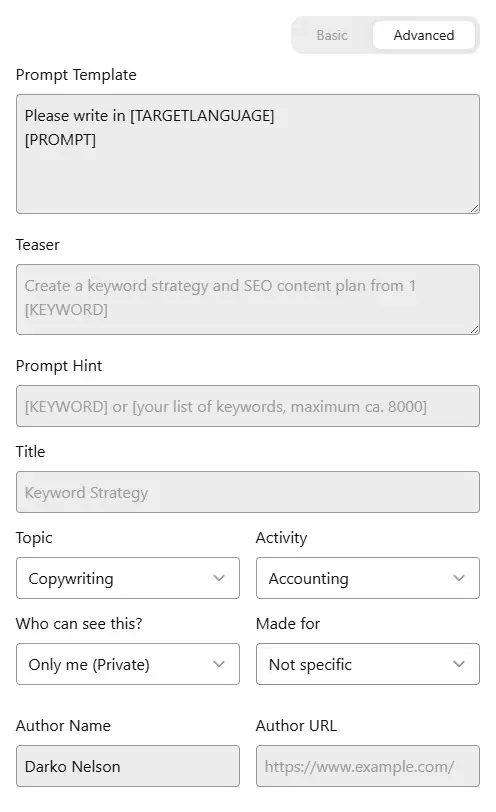
1. Prompt Template (the most important field)
What goes here?
This is the main ChatGPT prompt – the actual text AIPRM inserts into ChatGPT when someone clicks your prompt.
It must:
- work on its own
- contain clear instructions
- not require the user to add extra explanation
Example (Pinterest Pin – interactive prompt)
You are a Pinterest marketing and SEO expert. First, ask the user about the topic of the Pinterest pin. Once the user provides the topic, create:

1. An SEO-optimized TITLE (up to 100 characters)
2. A DESCRIPTION (2–3 sentences, optimized for Pinterest search)
3. 8–12 relevant SEO hashtags for Pinterest

Rules:
- Don't generate content until the user provides the topic
- Write in the same language the user replies in
- Focus on click-through rate and visibility on Pinterest
Start by asking the user for the topic.
2. Teaser
What goes here?
A short (one-sentence) description shown in the AIPRM prompt list.
This is what the user sees first.
Example
Generate a Pinterest title, description, and SEO hashtags from a given topic3. Prompt Hint
What goes here?
Helper text for the user telling them what to enter.
It doesn’t affect ChatGPT’s behavior , it just guides the user.
Example
Enter a topic or idea for a Pinterest pin4. Title
What goes here?
The name of the prompt as it appears in the AIPRM library.
It must clearly describe what the ChatGPT prompt does.
Example
Pinterest Pin – Title, Description, and Hashtags
5. Topic (Dropdown)
What do you select here?
The main category under which the prompt will be listed.
Recommended choice
Copywriting
(or Marketing, if available in your AIPRM setup)
6. Activity (Dropdown)
What do you select here?
The type of activity the prompt performs.
Recommended choice
Social Media
(if unavailable, Writing or Marketing also work)
7. Who Can See This?
What do you set here?
The visibility of the prompt.
For others to be able to use your ChatGPT prompt
Public
If set to Only me (Private), no one else will see it.
8. Made For
What do you select here?
Whether the prompt is meant for a specific profession.
Recommendation
Not specific
(since it’s useful to everyone)
9. Author Name
What goes here?
The author name that other users will see.
10. Author URL (Optional)
What goes here?
A link to:
- your website
- your portfolio
- your social media
Example: https://www.yourwebsite.com
(Not required, but it boosts credibility.)
Note: while you can write your ChatGPT prompt itself in any language, the template’s metadata fields must be filled in English only.
We’ve noticed a large number of prompts that were miscategorized or poorly described, which kept them from getting the visibility and popularity they deserved.
Can You Make Money Writing a ChatGPT Prompt?
Short answer: yes, but only with a smart strategy. There are two main ways to earn.
1. Selling Ready-Made Prompts on Marketplaces
These are platforms where you write a ChatGPT prompt once and sell it over and over again as a digital product.
Where to sell:
PromptBase is the largest and best-known prompt marketplace.

Sellers keep 80% of each sale, while the platform takes a 20% commission. You can sell prompts for ChatGPT, Midjourney, DALL·E, Stable Diffusion, and other models.
Etsy, Gumroad, Ko-fi are alternatives where you can sell prompt bundles with better margins.
FlowGPT, Promptrr, PromptScoop – smaller platforms, but with a growing user base.
2. Freelance Prompt Engineering (Services)
Instead of selling ready-made prompts, you can offer prompt-writing and optimization services to clients directly.
You can do this on any freelancing platform.
How much does it pay?
On Fiverr, prompt engineers charge between $30 and $125 per task, depending on the type of work.
3. Realistic Expectations
| Level | Earnings |
|---|---|
| Beginner (PromptBase, Fiverr) | $20–$200/month |
| Intermediate (freelance clients) | $200–$1,500/month |
| Experienced specialist | $1,500–$5,000+/month |
Selling a ChatGPT prompt on PromptBase is a legitimate way to earn some extra income each month, but it’s not a get-rich-quick scheme. It takes realistic expectations and consistent effort.
Frequently Asked Questions

Get the latest news!
Useful tips directly to your inbox – once a week, free of charge.
Conclusion
A well-structured ChatGPT prompt, the right category, and a clear description often make the difference between a prompt that goes unnoticed and one that gets real visibility and use. The examples above show just how much the technical details matter — but also how much room there is for creativity and a personal touch.
Learning to write a good ChatGPT prompt is a skill that keeps paying off, whether you’re using it to get better answers for yourself or to build a small income selling prompts to others.