
If you are searching for a clear, beginner-friendly explanation of how to start a Shopify store , you are in the right place. Shopify is today one of the most popular platforms for building an online store, and the good news is that you do not need any coding or design skills to get started.
Whether you plan to sell physical products, digital goods, or services , this step-by-step guide for beginners walks you through everything from your first click to launch your Shopify store in 2026.
By the end of this guide you will know how to register, configure your store, choose the right Shopify pricing plan, and understand what to expect during your free trial period.
What Is Shopify? An E-commerce Platform for Beginners
Shopify is the world’s leading e-commerce platform, trusted by millions of entrepreneurs and small businesses to create and manage online stores.
It is designed so that anyone can sell online without coding or design experience.
With Shopify you get a drag-and-drop store builder, hundreds of customizable themes, and a full set of built-in tools to manage inventory, pricing, shipping, and customer communication — all from a single dashboard.
Shopify also integrates with social media channels, existing websites, blogs, and major online marketplaces, making it a flexible choice for selling across multiple platforms from day one.
How to Register on Shopify: Start Your Free Trial
Starting on Shopify is simple. Visit the Shopify website and enter your email address to begin your free trial (currently 3 days, sometimes extended to 14 days during promotions).
No credit card is required to explore the platform during the trial period.

Shopify Onboarding: Answering the Setup Questions
After signing up, Shopify guides you through a short onboarding questionnaire to personalize your experience. Here is what each question means and how to answer it.
Are you just starting out or do you already have a store?
Select whether you are brand new or migrating from another platform. If you are starting from scratch, Shopify will provide additional beginner guidance throughout your setup.

Where do you plan to sell?
You can choose an online store, integrate with an existing website or blog, sell through social media (Facebook, Instagram, TikTok), or list on marketplaces like Amazon.

You can select multiple sales channels at once.
What do you plan to sell?
Choose from physical products, digital goods (eBooks, courses, software), or services.
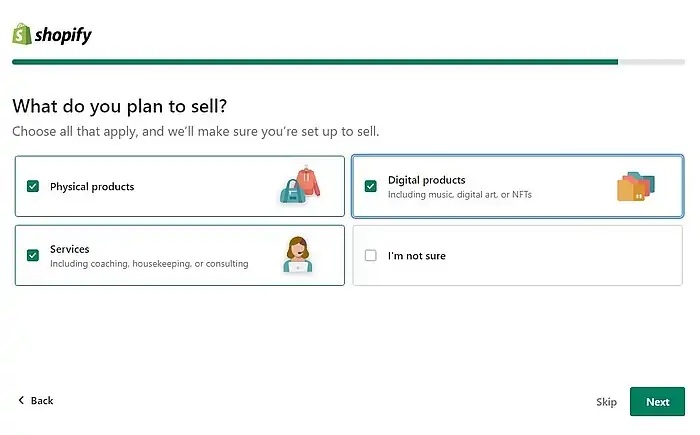
This selection helps Shopify recommend the most relevant features and apps for your business type.
Where will you source your products?
Shopify offers three options: selling products you make yourself, dropshipping from a supplier (no inventory needed), or using a print-on-demand service such as Printify.
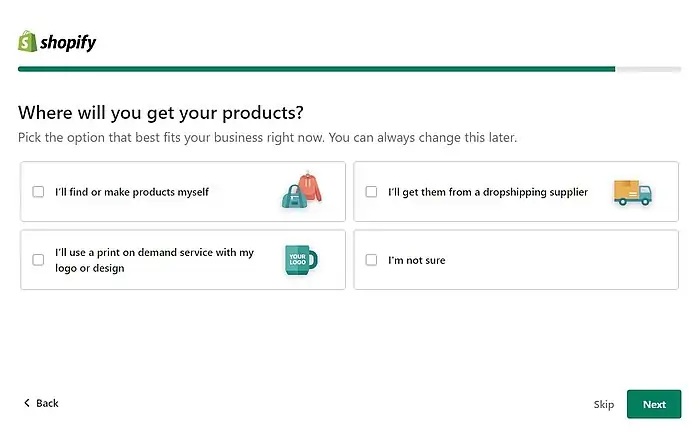
Each option is explained in detail in our separate guides.
Choosing Your Shopify Store Name and URL
Next, enter your store name. Shopify automatically creates your default URL as storename.myshopify.com.

You can connect a custom domain later , either purchased directly through Shopify or from a third-party registrar like Namecheap or Google Domains – which will replace this default address.
Setting Your Store Location
Enter the country where your business is based.

Shopify uses this to set default shipping rates, calculate taxes, and recommend country-specific apps and payment providers.
Creating Your Shopify ID and Logging In
After the onboarding, Shopify asks you to create a Shopify ID – your account login.
You can use an existing Apple, Facebook, or Google account for quick setup, or register with an email address and a new password.
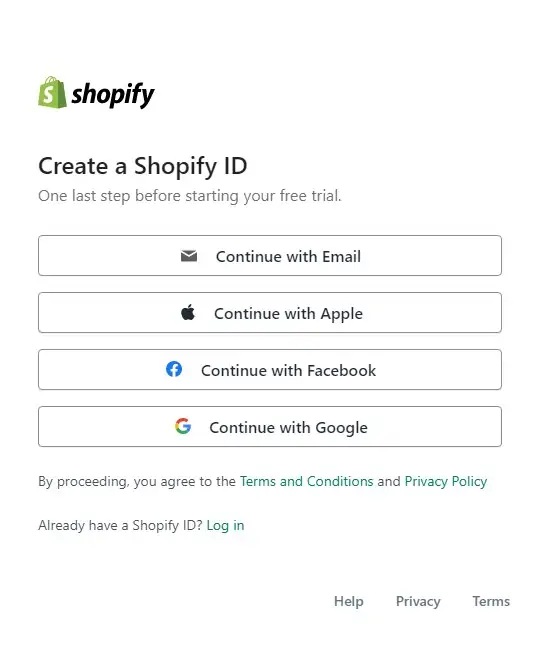
If you choose email sign-up, set a strong password. You will use this email and password every time you log in to your Shopify admin. Verify your email address to complete registration.

Shopify Pricing Plans 2026: Which Plan Is Right for You?
Right after registration you can dive into editing your store, but we recommend choosing a plan first so you can access all features from the start.
Here is a breakdown of the current Shopify pricing plans:

| Plan | Monthly price | Best for |
|---|---|---|
| Basic | ~$26/mo (after intro offer) | Beginners, solo sellers |
| Shopify | ~$69/mo | Growing stores, small teams |
| Advanced | ~$299/mo | Scaling businesses, automation |
The Basic plan is currently offered at $1/month for the first 3 months as an introductory rate , ideal for testing the platform while keeping costs low. It is enough to launch and run a functional online store for most beginners.
If you plan to scale seriously, the Advanced plan at $299/month includes automatic currency conversion, professional sales analytics, advanced tax calculation, multiple staff accounts, and USPS Priority Mail shipping management.
Monthly vs Annual Billing
After choosing a plan, select monthly or annual billing. Annual billing offers significant savings – typically 25% off compared to paying month to month. If you are committed to growing your store, the annual option is the smarter financial choice.

Entering Your Business Address
Fill in your complete business address: full name, street address, postal code, city, state/region, and phone number.
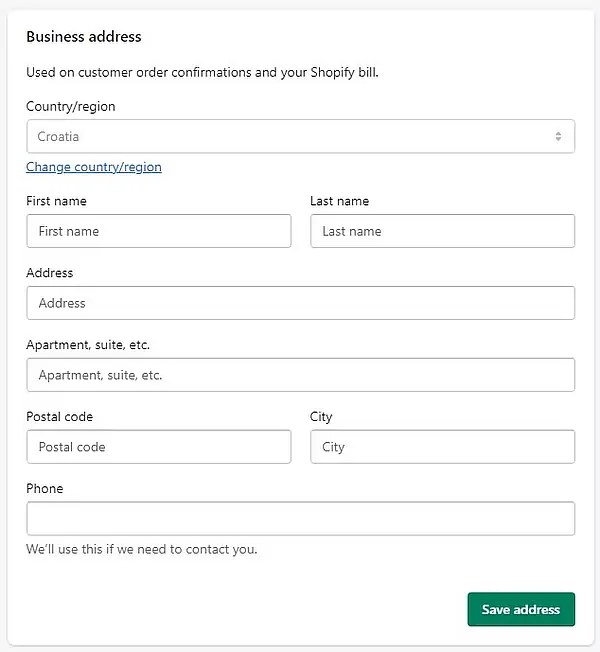
This information is required for billing and for Shopify to configure your store settings correctly.
Payment Method for Your Shopify Subscription
Finally, choose how to pay for your Shopify subscription: credit/debit card or PayPal.
If you link PayPal, a payment order is issued immediately but nothing is charged until your trial or intro period ends. With the Basic plan you will pay approximately $24 + applicable taxes after the first three months.

Important: If you decide not to continue, cancel your subscription through PayPal or Shopify store before the billing date to avoid charges.

Frequently Asked Questions About How to Start a Shopify Store
Quick answers to the most common questions beginners have before creating a Shopify store.
Conclusion: Is Shopify Worth Starting in 2026?
Shopify remains one of the most complete and beginner-friendly e-commerce platforms available in 2026.
The setup process is intuitive, the onboarding questions help tailor your experience, and the range of plans means you can start small and grow without switching platforms.
Getting used to all the features takes a little time, but the free trial makes it risk-free to explore. In our next post we will cover how to customize your Shopify store theme and upload your first products.
Prefer to have a professional handle the entire setup for you? We offer that service as well – get in touch here.

Useful tips directly to your inbox – once a week, free of charge.